


Solitaire Home Design
4.39.28K Reviews
App Specs
- Version
- 1.0.163
- Updated On
- License
- Free
- Downloads
- 5,000,000+
- Developer
- BETTA GAMES
- Categories
- Card
- Platform
- Android
Screenshots



 Analysis by AppCompare
If you're choosing a casual card game, the key question is whether you want cards alone or a reason to keep progressing between rounds. I like Solitaire Home Design most when I want a familiar solitaire session with a visual project attached: a win earns progress toward changing rooms, so the game gives each puzzle a small payoff beyond clearing the cards. That combination is appealing, but it also means the experience is not the same as a stripped-back solitaire app. The design and story are part of the draw, and they suit some players much more than others.
I’d consider it if you enjoy both card puzzles and making choices about interiors, and if you prefer a game that gives you several kinds of progress to follow. If your ideal solitaire game is quiet, quick, and focused only on the cards, the room renovation layer may feel like an interruption rather than a bonus. That distinction is worth keeping in mind before you settle in: this is a card game wrapped around a home-design journey, not simply a digital version of a standard solitaire deck.
First Impressions
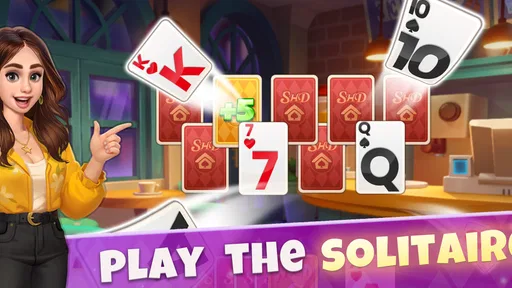
When I first launched the app, the vibrant colors and whimsical design immediately caught my attention. The interface is intuitive, making it easy for anyone to jump right in, whether you're a solitaire novice or a seasoned pro. The game seamlessly integrates the classic solitaire mechanics we all know and love with a fresh twist—home renovation!
It is a free card game from BETTA GAMES, rated for Everyone, and it has reached over five million installs. Its average rating is 4.4 from around 130,000 ratings, which gives a new player a useful sense of its broad appeal without telling the whole story of whether its particular mix will suit them. It was released on September 3, 2020, and version 1.0.157 is the current version. The game is available on Android and iOS, with Android 9 as the minimum operating-system requirement.
The Gameplay
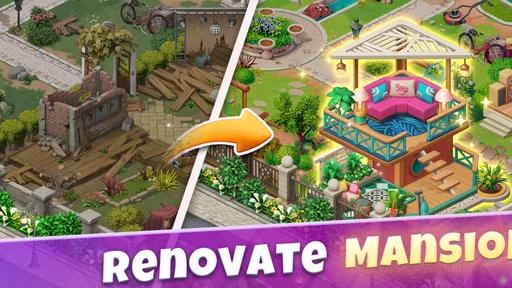
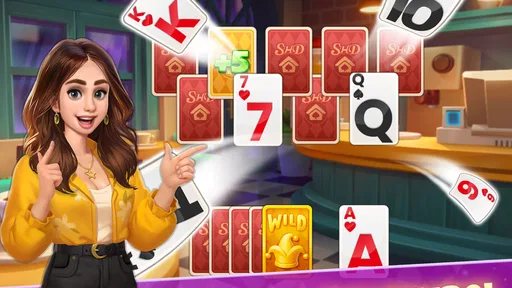
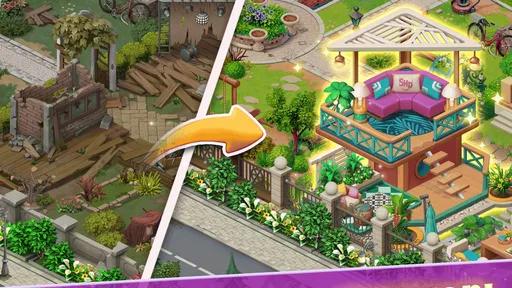
At its core, Solitaire Home Design offers a familiar solitaire experience. You’ll find yourself arranging cards in ascending order, just like the good old days. But here’s where it gets exciting: each round of solitaire you win earns you stars, which you can then use to revamp different rooms in your virtual home. Trust me, it’s incredibly satisfying to see a room transform from drab to fab with just a few taps.
That link between a card win and a design decision gives the game a useful rhythm. I can play a round, spend the reward on a visible change, and then stop without needing to treat the session as one long project. It is also a reason to pay attention to the renovation choices: if I’m saving a short break for one particular room update, it helps to know that card play is the step that earns the stars, rather than expecting the decorating itself to move the puzzle forward.
For a realistic everyday use, I’d open it during a quiet commute or while waiting for an appointment, play a hand, and decide whether I have time for another before starting. The room progress makes a brief session feel connected to a larger goal. On the other hand, if I only have a moment and don’t want to think about a puzzle, the game may not be as convenient as a very simple tap-and-go pastime; the card challenge is still the central activity, even when the decorating is what first caught my eye.
Worth Reading Before You Choose

EA SPORTS FC Mobile 26 Is a Bigger Football Game, but It Takes Time

Flipboard Shows What News Apps Must Do Beyond the Feed

Switching to Android Auto Means Rethinking Your Driving Routine

Google Calendar Makes a Crowded Week Easier to Manage

Ludo King Makes the Most of the Minutes Between Plans

Baby Panda World Brings Quick Play to Modern Phones, but Its Game Library Feels Busy
A practical tip is to treat the card round and the decorating choice as two parts of the same loop, rather than rushing through both. The stars make a win feel tangible, while the design decisions let me personalize the result. If I’m playing casually, I can enjoy the room change as a reward; if I’m more focused on the cards, I can regard the renovation as a bonus between puzzles. That flexibility is a strength, though a player who dislikes switching attention between game types may find the loop less satisfying.
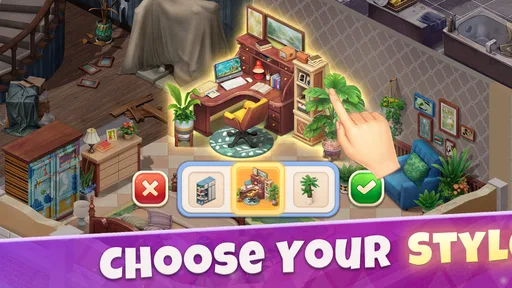
The home design aspect is surprisingly detailed. You get to choose everything from furniture styles to wall colors, allowing for a personalized touch that keeps things interesting. Plus, the game offers a variety of design challenges that test your creativity and keep you coming back for more.
Features Galore
One of the standout features of Solitaire Home Design is its engaging storyline. You’re not just playing solitaire and designing rooms; you’re following a narrative filled with charming characters and intriguing twists. It’s like your favorite home renovation show, only interactive. The story unfolds as you progress, adding an extra layer of motivation to keep playing.
This story-led structure is where the game differs from a conventional solitaire app most clearly. A traditional card-only alternative is a better match if all you want is to play hands without following characters or managing a renovation goal. Here, the narrative gives the rooms context, which can make a design decision feel more meaningful than a cosmetic change on its own. The trade-off is that the story is not just background: if you’re not interested in following it, some of the game’s motivation will be lost.
Another feature that I found particularly appealing is the social aspect. You can connect with friends, compete in design challenges, and even share your stunning room makeovers. It adds a sense of community that’s often missing in solitary card games.
That social side can make the decorating feel less like a private checklist and more like something to show other people. I’d lean into it if I enjoy comparing creative choices, but I wouldn’t choose this game solely for social competition; its core loop still depends on solitaire and the home progression. Players who prefer a strictly solo card puzzle may be happier with a more focused alternative, while people who like a little shared activity can get more out of the design challenges and room sharing.
The game is free to download, but it includes in-app purchases ranging from $0.99 to $199.99 per item. I’d approach those as optional spending, not as a reason to start buying automatically whenever progress slows. A sensible way to play is to try the card-and-design loop first and decide whether the pace is enjoyable without paying. If a purchase ever becomes tempting, I’d pause and ask whether I’m paying for something I genuinely want or simply trying to hurry through a section. That small check helps keep a casual game from turning into an unplanned expense.
For anyone wondering whether this is suitable for younger players, its Everyone content rating makes it broadly accessible. The more useful household decision is still about spending habits: because optional purchases are available, I’d keep purchase controls in mind when sharing a device with a child. The rating describes the content suitability, while the purchase setup is a separate practical consideration.
The Aesthetic
Visually, the game is a treat. The graphics are crisp and colorful, making every room transformation feel like a mini masterpiece. The attention to detail is impressive, from the intricate card designs to the variety of decor options. Whether you prefer a cozy cottage vibe or a sleek modern look, the game has got you covered.
The visual appeal also helps explain why this is a stronger fit for players who enjoy seeing progress rather than only keeping score. A room change gives the game a clear before-and-after feeling, and the different decor choices invite me to think about the mood I want rather than treating every reward as interchangeable. My advice is to make choices for your own taste instead of trying to optimize every room as if there were a single correct design. The pleasure here comes from shaping the space, not from turning interior choices into another puzzle to solve.
The sound effects and background music also deserve a mention. They’re subtle yet effective, enhancing the overall experience without becoming a distraction. It’s the kind of game you can easily lose yourself in for hours.
That last point is also a reason to set a natural stopping point. The combination of another solitaire hand and another visible room goal can make it easy to continue longer than intended. I find it helpful to stop after a room decision or a short run of card play, especially if I opened the game for a brief break. If I’m looking for a game that stays strictly limited to one quick round, this layered progression may encourage more play than I planned.
Choosing It Over Other Solitaire Games
Compared with the usual alternatives, the choice is less about which game is objectively better and more about what I want from a card session. A plain solitaire app keeps attention on arranging cards and is the cleaner option for players who value minimal distractions. A broader casual puzzle game may offer a different kind of challenge, but it will not necessarily provide this particular connection between winning a hand and customizing a home. This game’s distinctive appeal is the combination: the card puzzle supplies the moment-to-moment activity, while the design and story give it a longer arc.
I’d choose it over a basic solitaire game when I want a sense of ongoing progress and enjoy decorating choices. I’d choose a more traditional version when I want the cards to be the entire experience, or when I don’t want story and renovation to shape the pace. That is not a flaw so much as the central trade-off. The extra layers make the game more inviting to a design-minded player, but they also make it less suitable for someone who wants a pure, uncluttered card table.
Switching from another solitaire game should be easy in one sense: the card activity is familiar, so I don’t need to approach the whole idea as a new genre. The adjustment is in expectations. I have to be willing to treat the room progression and narrative as part of the session rather than as decoration around a self-contained hand. If I try it and discover that I mainly want uninterrupted solitaire, returning to a simpler card game is a sensible choice; there is no need to force myself to enjoy the extra layer.
Final Thoughts
So, is Solitaire Home Design worth checking out? Absolutely! It’s a refreshing take on the classic game of solitaire, with enough unique features to keep you engaged. Whether you’re a fan of card games, home design, or just looking for a casual game to unwind with, this app ticks all the boxes.
My recommendation is strongest for someone who likes a familiar card puzzle but wants a visible project to build alongside it. It can suit a relaxed evening, a short wait, or a small break when I want something more engaging than passive scrolling. I’d be more cautious if I were recommending it to a player who dislikes narrative, prefers a purely competitive card experience, or wants every session to end as soon as a hand is done. In those cases, a conventional solitaire game is likely the better fit.
Available for both Android and iOS, it’s easily accessible and free to download. Just be ready to invest some time because once you start, it’s hard to put down. Happy designing!
Pros
- Engaging and addictive gameplay.
- Beautiful graphics and design.
- Smooth and intuitive controls.
- Frequent updates and new content.
- Offline mode available.
Cons
- Some levels can be too challenging.
- Occasional in-app purchase prompts.
- Ads can be intrusive at times.
- Battery consumption is relatively high.
- Requires internet for some features.
FAQs for Solitaire Home Design
What is Solitaire Home Design?
Solitaire Home Design is a unique mobile game that combines classic solitaire gameplay with home design elements. Players solve solitaire puzzles to earn coins and rewards, which can then be used to renovate and decorate various rooms in a virtual house. It offers both strategic card play and creative design challenges.
Is Solitaire Home Design free to play?
Yes, Solitaire Home Design is free to download and play. However, it does include optional in-app purchases that can enhance the gaming experience. Players can buy additional coins or special items to speed up progress or unlock exclusive design options. Be mindful of spending if you choose to make purchases.
Can I play Solitaire Home Design offline?
Solitaire Home Design requires an internet connection to download and install updates, as well as to access some online features like leaderboards and events. However, once installed, you can enjoy the basic solitaire puzzles and design tasks offline. Some features may be restricted without a connection.
What devices are compatible with Solitaire Home Design?
Solitaire Home Design is available for both Android and iOS devices. It is compatible with most modern smartphones and tablets. It's advisable to check the game’s requirements on the device’s app store to ensure compatibility, particularly if you're using an older device model.
Are there any ads in Solitaire Home Design?
Yes, like many free-to-play games, Solitaire Home Design includes ads. These advertisements help support the game’s development and are typically displayed between levels or as optional videos for additional rewards. Players can remove ads through in-app purchases if they prefer an uninterrupted experience.


